Download Avaya Aura Communication Applications Support Certified Exam.72301X.Pass4Success.2026-10-19.57q.vcex
| Vendor: | Avaya |
| Exam Code: | 72301X |
| Exam Name: | Avaya Aura Communication Applications Support Certified Exam |
| Date: | Oct 19, 2026 |
| File Size: | 1 MB |
How to open VCEX files?
Files with VCEX extension can be opened by ProfExam Simulator.
Discount: 20%

Demo Questions
Question 1
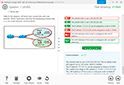
Refer to the exhibit.
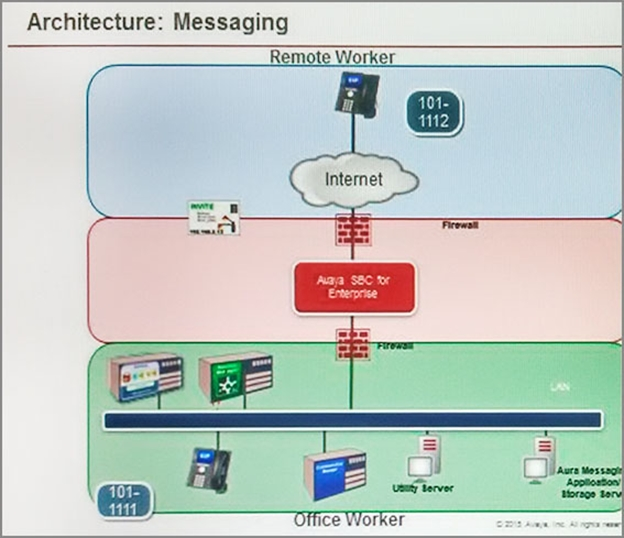
Avaya Tier 3 support receives a case escalated by Tier 2 where the customer cannot receive incoming calls, but can make calls out successfully. The trace shows that the incoming calls arrive at the Avaya Session Border Controller for Enterprise (SBCE) but fail to get routed into the customer enterprise network.
Based on this information, what is and is not working?
- The local area network, Avaya Aura Communication Manager, and Avaya Aura Session Manager are working. SBCE is partially working, but routing may be incorrect.
- The local area network, Avaya Aura Communication Manager, and Avaya Aura Session Manager are working. The public network is not working.
- The local area network, Avaya Aura Communication Manager, and Avaya Aura Session Manager are working. SBCE is not working.
- The local area network and Avaya Aura Session Manager are working. Avaya Aura Communication Manager is not working.
Correct answer: A
Explanation:
Communication Manager is working because can make calls out successfully, SBCE is partially working * Notice that the FROM header is an IP address instead of a domain name = avava.com. CM needs to see domain name. IP address to domain conversion is performed by Topology Hiding.
Question 2
What are two ways to view the ipcs.log file of an Avaya Session Border Controller for Enterprise (SBCE) High Availability (HA) system? (Choose two.)
- Login to the EMS using a web browser, then click on Logs > System Logs.
- Login to the active SBCE, and cat /archive/syslog/ipcs/ipcs.log.
- Login to the EMS and cat /archive/syslog/ipcs/ipcs.log.
- Login to the EMS using a web browser, then click on the active SBCE under Installed Devices, then click on View System Logs.
- Login to the EMS and cat /var/log/ipcs.log.
Correct answer: A, B
Question 3
On the Avaya Session Border Controller for Enterprise (SBCE), which tool would you use to view WebRTC messages coming through SBCE?
- webrtctrace on
- traceWEBRTC
- traceHTTP
- traceSBC
Correct answer: D
Question 4
A customer reports that remote worker users cannot see their feature buttons. Their Avaya Session Border Controller for Enterprise (SBCE) was recently damaged and replaced due to a lightning strike. After doing some troubleshooting, support was able to see that PPM was misconfigured in the SBCE.
Which tool was used, and which symptoms were visible that pointed to this issue?
- List trace; PPM requests were going to Avaya Aura Session Manager instead of the PPM server
- traceSM; SIP requests were going to Avaya Aura Session Manager instead of SBCE
- traceHTTP; all HTTP requests were going to SBCE instead of Avaya Aura Communication Manager
- traceSBC with PPM debugging enabled; PPM requests were seen to be going to the Utility Server instead of Session Manager
Correct answer: D
Explanation:
https://documentation.avaya.com/es-LA/bundle/AdministeringAvayaSBCE_r7.2.2/page/TraceSBC-Command.html
Question 5
The Entity Monitoring column on the Session Manager Dashboard shows two figures per line.
How should these two figures be interpreted?
- the first number indicates the number of retries, the second number indicates the total number of links monitored
- the first number indicates the number of unmonitored links, the second number indicates the total number of monitored links
- the first number indicates the total number of links monitored, the second number indicates the number of links down
- the first number indicates the number of links down, the second number indicates the total number of links monitored
Correct answer: D
Question 6
In Avaya Aura 7 the Avaya Session Border Controller for Enterprise (SBCE) license is installed on an external WebLM server and the EMS points to the WebLM server using a URL.
What is the correct syntax of that URL where 135.60.232.41 is the IP address of the WebLM server?
- https://135.60.232.41:8443/WebLM/LicenseServer
- https://135.60.232.41:8080/LicenseServer
- https://135.60.232.41:52233/WebLM/LicenseServer
- https://135.60.232.41/WebLM
Correct answer: C
Question 7
Which statement about Network Routing Policies in Avaya Aura Session Manager (SM) is true?
- A dial pattern and routing policy are necessary in SM to call from an H323 device to a Basic/Native SIP device (without an Avaya Aura Communication Manager profile).
- A dial pattern and routing policy are necessary in SM to call from a Basic/Native SIP device (without a CM profile) to an H323 device on Avaya Aura Communication Manager (CM).
- A dial pattern and routing policy are necessary in SM to call from an H323 device to an AST device on the same Avaya Aura Communication Manager (CM).
- A dial pattern and routing policy are necessary in SM to call from an AST device to an H323 device on the same Avaya Aura Communication Manager (CM).
Correct answer: B
Question 8
Incoming SIP Trunking calls from Service Provider to Session Manager are failing because Avaya Session Border Controller for Enterprise (SBCE) is not sending a domain name in the TO, FROM and REQUEST headers.
What needs to be changed in SBCE to make this happen?
- In SBCE GUI, navigate to Global Profiles > Routing. Edit the Session Manager Routing Profile to link to a URI Group, which has the To, From and Request Headers and Replace Action set to Overwrite with domain name.
- In SBCE GUI, navigate to Global Profiles > Server Configuration. Edit the Session Manager server entry to set ''Overwrite Domain Name''.
- In SBCE GUI, navigate to Global Profiles > Topology Hiding. Edit the SessionManager_TH to change the To, From and Request Headers Replace Action, to Overwrite with domain name.
- In SBCE GUI, navigate to Device Specific Settings > Endpoint Flows > Server Flows. Edit the Session Manager flow to change the End Point Policy Group to default-low.
Correct answer: C
Question 9
Who is responsible for Discipline 4, Determining Root Cause, of the 8D Troubleshooting Methodology?
- Business Partners
- Avaya Tier 2
- Third Party Support
- Avaya Tier 3
Correct answer: D
Question 10
Which tracing tools that help to debug WebRTC protocols are available on the Avaya Breeze platform?
- traceTURN, traceSTUN, and traceHTTP
- traceWEB and traceSM
- traceSTUN, traceTURN, and traceCE
- traceHTTP and traceCE
Correct answer: B
Explanation:
https://downloads.avaya.com/css/P8/documents/100182172
HOW TO OPEN VCE FILES
Use VCE Exam Simulator to open VCE files
HOW TO OPEN VCEX AND EXAM FILES
Use ProfExam Simulator to open VCEX and EXAM files
ProfExam at a 20% markdown
You have the opportunity to purchase ProfExam at a 20% reduced price
Get Now!